EA, Desktop and Cloud settings—explained.
Use this page before demo testing. It maps every execution surface, the full EA input inventory, Desktop controls, Cloud settings, and every supported Telegram management command.
EA
MT4/MT5 on your PC or VPS. Best when you already operate MetaTrader.
Open sectionDesktop
Local Telegram monitoring and MT5/IBKR handoff. Your device stays on.
Open sectionCloud
Hosted execution through a supported provider. No personal device required.
Open sectionEA · MT4 and MT5
Every EA input
The exact default, type, behavior, and safe use of each input is documented in the parameter table above. This inventory lets you confirm that no parameter group is missing.
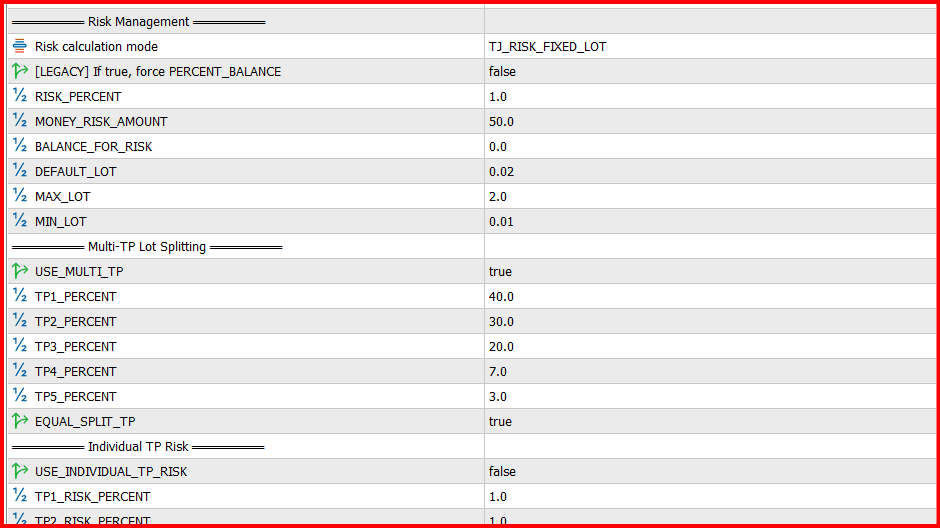
Real EA inputs: select a total lot large enough for every TP leg to meet the broker minimum volume.
Connection
API_URL, API_FALLBACK_URL, API_TOKEN, POLL_INTERVAL_SEC, COMMAND_POLL_SEC, SIGNAL_POLL_MS, COMMAND_POLL_MS, AUTO_DETECT_SYMBOLS
Account copier
ENABLE_MASTER_SOURCE, MASTER_SOURCE_MAGIC, MASTER_SYNC_EXISTING
Symbol mapping
SYMBOL_PREFIX, SYMBOL_SUFFIX, SYMBOL_MAP, SKIP_SUFFIX_PAIRS, EXCLUDED_PAIRS, ALLOWED_PAIRS
Risk
RISK_MODE, USE_RISK_PERCENT, RISK_PERCENT, MONEY_RISK_AMOUNT, BALANCE_FOR_RISK, DEFAULT_LOT, MAX_LOT, MIN_LOT
TP sizing
USE_MULTI_TP, TP1_PERCENT–TP5_PERCENT, EQUAL_SPLIT_TP, USE_INDIVIDUAL_TP_RISK, TP1_RISK_PERCENT–TP5_RISK_PERCENT, TP2_MULTIPLIER–TP5_MULTIPLIER
Signal rules
IGNORE_NO_SL, IGNORE_NO_TP, CHECK_DUPLICATE, FORCE_MARKET_PIPS, MULTI_TRADE_MODE, SAME_PAIR_CHECK_SCOPE, AUTO_CLOSE_OPPOSITE, EDIT_MESSAGE_ENABLED
SL, TP and R:R
SL_OVERRIDE_MODE, SL_FALLBACK_PIPS, SL_FALLBACK_PIPS_TP1–TP5, TP_OVERRIDE_MODE, TP_FALLBACK_PIPS, TP_FALLBACK_PIPS_TP1–TP5, RR_MODE, USE_RR_MODE, RR_RATIO, RR_RATIO_TP1–TP5
Entry changes
USE_PENDING, PENDING_PIPS_THRESHOLD, PENDING_EXPIRY_MIN, REVERSE_SIGNAL, REVERSE_USE_PIPS, ENTRY_ADJUST_PIPS, SL_ADJUST_PIPS, TP_ADJUST_PIPS
Breakeven and trailing
USE_BREAKEVEN, BREAKEVEN_PIPS, BREAKEVEN_AFTER_TP, BREAKEVEN_RR, BREAKEVEN_MONEY, SMART_PROFIT_LOCK, MOVE_SL_TRIGGER, MOVE_SL_TYPE, MOVE_SL_AFTER_X, HALF_CLOSE_PERCENT, USE_TRAILING, TRAILING_START, TRAILING_STEP, TRAILING_DISTANCE, TRAILING_MOVE_TP, TRAILING_AFTER_TP, USE_TRAILING_TP, TRAILING_TP_START
Schedule and news
USE_TIME_FILTER, TRADE_START_HOUR, TRADE_END_HOUR, TRADE_MONDAY–TRADE_SUNDAY, USE_NEWS_FILTER, NEWS_BLOCK_BEFORE_MIN, NEWS_BLOCK_AFTER_MIN, NEWS_IMPACT_LEVEL
Execution safety
MAX_RETRIES, RETRY_DELAY_MS, USE_PARTIAL_CLOSE, PARTIAL_CLOSE_TRIGGER, PARTIAL_CLOSE_PERCENT, SPECIAL_RISK, SYMBOL_LOT, INCLUDE_SPREAD, BLOCK_DUPLICATE_ENTRY, USE_TP_CASCADE
Prop firm and terminal
PROP_FIRM_MODE, STEALTH_MIN_SEC, STEALTH_MAX_SEC, RANDOMIZE_COMMENT, USE_COMMENT, COMMENT_TEXT, DAILY_LOSS_LIMIT, DRAWDOWN_LIMIT, PROFIT_TARGET, FIFO_MODE, SEND_NOTIFICATION, MAGIC_NUMBER, MAX_SLIPPAGE, MAX_SPREAD_PIPS, MAX_CONSEC_LOSSES, EQUITY_DD_BREAKER
Windows Desktop
Desktop controls and settings
Desktop settings exist at three levels: connection, global execution, and per-channel overrides. Save, run TEST, confirm TCP/IBKR connectivity, then start monitoring on demo.
Connection and routing
Activation token
Paste an EA/Desktop account token from Signal Copier. It identifies the user and destination; never share it publicly.
Phone
Telegram number in international format. The login code and optional 2FA complete the local Telegram session.
MT4/MT5 path
Choose the exact MetaTrader data folder that belongs to the intended broker account.
TCP Socket Bridge + port
Enabled · 9876
Fast local Desktop → MT5 handoff. The Bridge EA port must match. File bridge remains the recovery path.
Global execution
Global reverse mode
Turns BUY into SELL and the other way round for every selected channel; the stop and targets move to the other side at the same distance (2.8.7+).
Skip signals without SL
Rejects entries that have no stop-loss.
Auto-close opposite
Closes the opposite position on the same symbol before opening the new direction.
AI fallback parser
Uses the server parser only when the local structured parser needs help.
Image OCR
Extracts signal text from supported Telegram image messages.
Risk and position management
Risk mode
Fixed lot · Risk % · Money risk
Select exactly one sizing method. All results remain bounded by the broker minimum/step and your hard limits.
Trailing stop
Choose start by pips or an exact TP, then set distance and minimum modification step.
Breakeven
Choose trigger by pips or exact TP, then set how many profit pips to lock above entry.
Equity Guardian
Stops or closes according to the selected percentage/money trigger and check interval.
Correlation Guard
Limits simultaneous exposure sharing the same base/quote currency.
Signal quality filter
Rejects parsed signals below the configured quality score.
Channel and monitoring controls
Enable channel / Reverse / Skip no SL
Each selected channel has independent enablement and safety behavior.
Channel rules
Desktop 2.8.7+
The website's channel settings, per channel, in CONFIG: Ask me first, copy delay, only/never these pairs, skip words, forwarded posts, hours and days (UTC), a daily cap, minimum quality, the same signal from another channel, which targets open, entry/stop/target shifts, slippage, a stop or target when the post has none, smart entry, trades on the same pair, duplicates, close the opposite trade, max per pair, and a symbol for posts that name none.
Channel risk %
Desktop lots come from the Bridge EA's inputs. A channel's own risk % goes in the Bridge EA's ChannelRiskOverrides input (channelId:risk%); CONFIG → Lot size writes the entry.
Performance filter
Auto-pauses a channel below minimum win rate, after enough samples, or after the configured loss streak.
START / STOP
Starts or pauses Telegram monitoring. Open positions remain broker-side.
TEST / CHECK / DEBUG
Parse a sample, validate bridge files, and open diagnostic evidence before live trading.
PERF / RANK / CSV / REPORT
Review provider performance, rankings, exports, and daily results.
Cloud execution
Cloud account and channel settings
Cloud applies account limits and channel rules before every order. Broker validation remains final: symbol availability, minimum volume, stops distance, market hours, margin, and account mode can still reject an order.
Account connection
Provider
MetaApi · api2trade · TradeLocker
Select the provider that supports the broker/platform. Provider charges and capabilities differ.
Login, trading password, server, platform
Must exactly match the broker account. Start with demo and never use an investor/read-only password for execution.
Demo / live mode
Demo is the required first test. Moving to live is a separate deliberate step.
Maximum concurrent trades
A hard account-level ceiling; 0 means unlimited.
Hidden SL/TP + disaster stop
Server-managed protection. It depends on Cloud availability, so a wide broker fallback stop is strongly recommended.
Channel execution settings
Target account
Routes the channel to one EA, Cloud, exchange, or IBKR account. Blank can broadcast to eligible accounts.
TP selection
All · One · Custom
Choose TP1–TP10. Cloud opens one broker leg per executable selected target when the account supports hedging.
TP split
Equal · Custom percentages
Splits one total risk/lot budget. Every leg must meet the broker minimum volume.
Breakeven after TP
Price rules · TP1–TP10
Exact TP mode waits for that target milestone before protecting remaining legs.
Trailing after TP
Price rules · TP1–TP10
Independent from breakeven; starts trailing only after the selected milestone.
Entry mode
Market · Pending · Smart entry · DCA
Controls when and how orders are placed. DCA and pending orders require valid live quotes.
SL/TP override
Off · If missing · Always
Keeps signal levels, fills missing protection, or replaces levels using configured pip distances.
Filters
Pairs, excluded pairs, confidence, no-SL/no-TP, time/day, spread, news, duplicates, and daily count guards run before submission.
Prop-firm controls
Daily loss, drawdown, profit target, FIFO, comment behavior, delay, correlation, and exposure limits.
Telegram management
Every supported command
Commands are detected in supported languages and common shorthand. Put the symbol in the command whenever possible. A Telegram-channel command is restricted to positions originating from that channel; a command sent from your own bot/dashboard is intentionally account-wide.
| Command | Examples | Action | Scope / limitation |
|---|---|---|---|
| Close all | CLOSE ALL | Closes every matching open position. | Telegram channel positions only; bot/dashboard commands are account-wide. |
| Close symbol | CLOSE XAUUSD · CLOSE GOLD | Closes every matching position for one symbol. | Matching channel and destination. |
| Close TP leg | CLOSE TP2 XAUUSD · TP2 HIT | Closes only the broker leg assigned to that TP level. | TP1–TP10 for the matching signal group. |
| Partial close | CLOSE XAUUSD 50% · CLOSE HALF | Reduces the matching position by the requested percentage. | Broker minimum volume and lot step still apply. |
| Breakeven | BE XAUUSD · MOVE SL TO ENTRY | Moves stop-loss to entry on matching open positions. | Never increases exposure. |
| Modify stop | MOVE SL XAUUSD 4350 · SL +20 PIPS | Changes stop-loss to an absolute price or supported pip offset. | Matching positions only. |
| Modify target | MOVE TP2 XAUUSD 4420 · TP 4500 | Changes one selected TP leg or all matching TPs when no index is supplied. | TP index must exist on the trade. |
| Remove stop | REMOVE SL XAUUSD | Removes stop-loss from matching positions. | High risk; use only when deliberate. |
| Remove target | REMOVE TP XAUUSD | Removes take-profit from matching positions. | The trade remains open. |
| Modify entry | MOVE ENTRY XAUUSD 4340 | Changes the entry price of a matching pending order. | Does not modify an already-filled position. |
| Cancel | CANCEL XAUUSD · CANCEL ALL | Cancels matching pending broker orders and queued signals. | Open positions are not closed. |
| Layer | LAYER XAUUSD · ADD POSITION | Adds another position using the matching trade as the template. | Subject to risk, duplicate, capacity, and broker rules. |
Correct test order
- 1. Connect only a demo or paper destination.
- 2. Select one private test channel.
- 3. Use minimum valid volume for the selected TP count.
- 4. Send one market signal with SL and TP1–TP2.
- 5. Confirm every broker ticket and journal row.
- 6. Test BE, modify SL, close TP1, then close all.